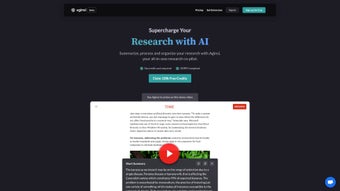

Download Aginsi – AI Research Tool for Academics, Journalists & Consultants
Aginsi is a cloud‑native, subscription‑based AI research assistant designed to bring every stage of the knowledge‑gathering workflow into a single, privacy‑first environment. Launched on 14 March 2023, the platform targets scholars, investigative reporters, and consultancy professionals who regularly face mountains of text, data‑heavy PDFs, and fragmented note‑taking systems. By leveraging state‑of‑the‑art natural‑language processing, Aginsi automatically extracts key insights, generates contextual tags, and organizes every fragment into a searchable, collaborative workspace.
Its integration layer connects directly with Microsoft Office, Google Docs, and Notion, allowing users to push research outputs straight into the writing tools they already trust. Security is baked in: end‑to‑end encryption, GDPR and CCPA compliance, and a strict “no‑tracking” policy ensure that sensitive research material never leaves the secure vault. While Aginsi currently lives only in a modern web browser—meaning there is no native desktop or mobile app—its responsive design works flawlessly on Windows, macOS, Chrome OS, iOS, Android, and any Linux distribution that runs a current version of Chrome, Edge, Firefox, or Safari.
In short, Aginsi consolidates the entire research lifecycle—from ingestion to export—into a single, secure, and AI‑enhanced hub.
Features & Installation – From First Login to Full‑Fledged Research
Key Features That Redefine the Research Cycle
- AI‑Driven Summarisation: One‑click extraction of key points from PDFs, web pages, and plain‑text documents, delivering concise abstracts in seconds.
- Automatic Tagging & Organisation: Machine‑learning models generate contextual tags, clustering related excerpts for rapid navigation and thematic grouping.
- Seamless Editor Integration: Plug‑ins for Microsoft Word, Google Docs, and Notion let you export research notes directly into your manuscript without losing formatting.
- Collaborative Workspaces: Real‑time sharing, commenting, and built‑in chat enable teams to co‑author literature reviews or investigative dossiers simultaneously.
- Privacy‑Centric Architecture: End‑to‑end encryption, GDPR & CCPA compliance, and zero‑tracking data policies protect intellectual property at every step.
- Customisable Export Formats: Export collections as CSV, JSON, Markdown, BibTeX, or RIS for downstream analysis or citation‑manager import.
- Version History & Undo: Automatic snapshots let you revert to previous research states without data loss, ensuring a safety net for every edit.
- Smart Semantic Search: Context‑aware search across all uploaded materials, with filters for date, source, tag, and confidence score.
- API Access & Automation: Generate an API key to programmatically upload documents, retrieve summaries, or integrate Aginsi’s engine into custom pipelines.
- Responsive Design: Fully optimised UI adapts to desktops, tablets, and mobile browsers, ensuring a consistent experience across devices.
Installation & First‑Time Use – Simple, No‑Download Setup
Because Aginsi lives entirely in the cloud, there is no traditional “installation” process. Users simply navigate to aginsi.com, click the Sign Up button, and select a subscription tier (Basic – $9.99 / month, Professional – $19.99 / month). After confirming the email address, the dashboard loads a clean three‑pane layout: a left‑hand navigation tree, a central document viewer, and a right‑hand annotation panel.
To launch a new research project, click “New Workspace,” give it a meaningful title, and drag‑and‑drop source files (PDF, DOCX, TXT, or URLs). The AI engine immediately begins analysing the content, producing a concise summary and a set of auto‑tags that appear in the side panel. Users can edit tags, create custom categories, or merge duplicates with a single click. When the research is ready for drafting, the “Export to Editor” button opens a modal where you choose the target application (Word, Google Docs, Notion). With one click, the platform injects tagged notes, summaries, and citations into the selected document, preserving formatting, hyperlinks, and reference styles.
Collaboration is equally straightforward. Invite teammates by email, assign role‑based permissions (view‑only, comment, edit), and watch changes appear in real time. The built‑in chat window lets you discuss findings without leaving the workspace, and a shared activity feed logs every annotation, tag edit, and export action for full transparency. Power users can retrieve an API key from the account settings to automate bulk uploads, trigger summarisation via webhook, or embed Aginsi’s summarisation endpoint into internal research pipelines.
Compatibility, Pros & Cons – A Balanced Look at Aginsi
Aginsi is a web‑based solution, meaning it runs on any operating system that supports a modern browser—Chrome, Edge, Firefox, Safari, or any Chromium‑based engine. No native client is required for Windows, macOS, or Chrome OS, and the responsive UI scales gracefully to tablets and large‑screen laptops. While a dedicated mobile app for iOS or Android is not yet available, the platform’s mobile‑friendly design allows researchers to work on the go via a browser, albeit with a slightly trimmed toolbar.
Pros
- All‑in‑one AI research hub eliminates the need for multiple disparate tools.
- Automatic summarisation and tagging dramatically cut down manual note‑taking time.
- Deep integration with Microsoft Office, Google Docs, and Notion streamlines the hand‑off to writing.
- Strong privacy guarantees, including end‑to‑end encryption and GDPR/CCPA compliance.
- Collaborative workspaces support real‑time team research without version‑control headaches.
- Cross‑platform accessibility via any web browser, ensuring no OS lock‑in.
- Extensive export options (CSV, JSON, Markdown, BibTeX, RIS) simplify downstream analysis.
- API access empowers automation and custom workflow integration.
Cons
- No native mobile applications for iOS or Android, limiting offline workflow.
- Lack of a Linux‑specific desktop client may deter power users who prefer local apps.
- Subscription pricing can be a barrier for occasional researchers or students on a tight budget.
- Advanced AI features (e.g., custom model training) are only available in the highest tier.
- Initial AI summarisation may occasionally miss nuanced arguments, requiring manual verification.
- Full functionality depends on a stable internet connection; offline access is limited to previously loaded pages.
Overall Verdict: Aginsi scores a solid 4.5 out of 5 for its ability to centralise research, its AI‑powered automation, and its unwavering commitment to privacy. The missing mobile app and Linux support are the only notable gaps in an otherwise robust offering.
FAQ & Conclusion – Your Final Steps
Is Aginsi a free tool?
Aginsi operates on a subscription model. There is a 14‑day free trial that grants full access to all features, after which you can choose between the Basic ($9.99 / month) or Professional ($19.99 / month) plans.
Can I use Aginsi offline?
Because Aginsi is cloud‑based, an internet connection is required for AI processing, syncing, and collaboration. You can view previously loaded pages offline, but new summarisation or tagging actions need connectivity.
How does Aginsi protect my research data?
All data is encrypted in transit (TLS 1.3) and at rest (AES‑256). The platform complies with GDPR and CCPA, and the privacy policy explicitly states that no personal data is sold or tracked for advertising.
Does Aginsi integrate with reference managers like Zotero or Mendeley?
Direct plug‑ins are not yet available, but you can export research collections as BibTeX or RIS files, which can be imported into Zotero, Mendeley, or EndNote.
What browsers are officially supported?
Aginsi works on the latest versions of Chrome, Edge, Firefox, and Safari. Older browsers may experience reduced performance or missing UI elements.
For anyone whose daily workflow revolves around gathering, organising, and synthesising large volumes of text, Aginsi offers a compelling blend of AI automation, seamless editor integration, and rigorous privacy safeguards. While the lack of a dedicated mobile app and native Linux client leaves room for growth, the core experience is polished, reliable, and designed to cut research time by at least half for most users. If you’re ready to upgrade from juggling multiple PDFs, spreadsheets, and note‑taking apps, click the button below to start your free trial and see how Aginsi can transform your research routine.



.png)



